As someone who loves blending everything from smoothies to sauces, I know how frustrating it can be when your Ninja blender Auto-iQ suddenly stops working or behaves unexpectedly.
One moment, you’re preparing a creamy smoothie, and the next, the blender refuses to start, or the Auto-iQ programs aren’t responding.
Don’t worry—I’ve been there, and today, I’ll walk you through how to reset your Ninja blender Auto-iQ safely, troubleshoot common issues, and get it back to peak performance.
Table of Contents
- Understanding the Ninja Auto-iQ System
- Why Your Ninja Blender Auto-iQ May Need a Reset
- How To Reset Ninja Blender Auto-iQ: Step-by-Step Guide
- Common Auto-iQ Troubleshooting Tips
- Preventive Maintenance for Your Ninja Auto-iQ Blender
- When to Contact Ninja Support
- Frequently Asked Questions (FAQ)
- Conclusion
Understanding the Ninja Auto-iQ System
Before we dive into the reset process, let’s talk about what makes the Auto-iQ system special. Unlike traditional blenders, Ninja Auto-iQ blenders come with pre-programmed blending cycles designed to do the work for you. They control speed, pulsing, and pauses to achieve the perfect texture every time.
However, like any electronic appliance, these blenders can occasionally experience glitches—buttons may stop responding, the motor may lock, or the Auto-iQ program may freeze mid-cycle. This is where knowing how to reset a Ninja blender Auto-iQ becomes essential.
Why Your Ninja Blender Auto-iQ May Need a Reset
There are several reasons your blender may stop responding:
- Power fluctuations: Sometimes the outlet or power supply may not deliver consistent electricity.
- Overheating: Running the blender continuously can trigger a safety lock.
- Safety sensor activation: The Auto-iQ system won’t run if the pitcher, lid, or blade assembly isn’t seated correctly.
- Software glitches: Occasionally, the Auto-iQ program may freeze, requiring a reset.
- Internal motor or control board errors: Rare, but possible, especially in older units or heavily used blenders.
How To Reset Ninja Blender Auto-iQ: Step-by-Step Guide
Follow these 4 simple steps to reset your Ninja Blender:
Step 1: Power Off and Unplug Your Blender
This may seem obvious, but I always start by turning off the blender and unplugging it. Safety comes first! Here’s my process:
- Make sure the blender is off.
- Remove the pitcher from the base.
- Unplug the power cord from the wall.
Step 2: Check the Pitcher and Lid Alignment
One of the most overlooked reasons the Auto-iQ program fails is misalignment of the pitcher or lid. The blender’s safety sensors are precise—they won’t allow the motor to run unless everything is perfectly seated.
Here’s what I do:
- Align the arrows on the lid and the pitcher.
- Press the handle down firmly until you hear a click.
- Reseat the pitcher on the base, ensuring it locks into place.
Step 3: Reset the Ninja Blender Auto-iQ
Now comes the actual reset. Ninja Auto-iQ blenders don’t have a single “reset button,” but performing a full power cycle accomplishes the same thing:
- With the blender unplugged, wait 5–10 minutes. This allows residual power to drain from the control board.
- While waiting, check the blade assembly for obstructions. Sometimes, food residue or frozen chunks can cause the blender to freeze mid-program.
- After 10 minutes, plug the blender back in.
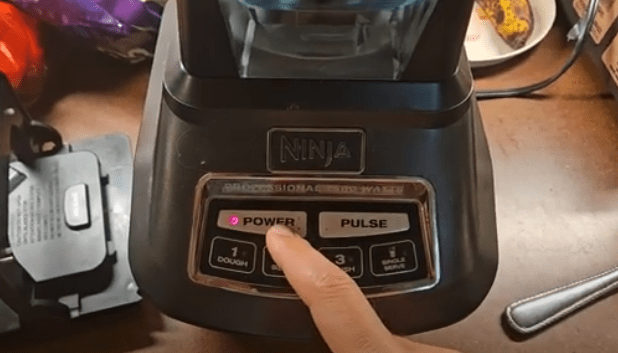
- Press the power button once to wake the system.
Step 4: Test the Auto-iQ Programs
After the reset, it’s important to verify that everything works as expected. I like to start with a simple test:
- Fill the pitcher with water.
- Run a short Auto-iQ cycle, such as the “Smoothie” program.
- Observe the blender’s behavior—speed changes, pulsing, and pauses should all occur normally.
Common Auto-iQ Troubleshooting Tips
Even after a reset, some users experience minor issues. Here are my tried-and-true troubleshooting tips:
1. Ninja Blender Not Working After Reset
If the Auto-iQ buttons still don’t respond:
- Double-check that the pitcher and lid are aligned.
- Ensure the outlet is functional by plugging in another appliance.
- Inspect the power cord for visible damage.
2. Auto-iQ Buttons Stuck or Unresponsive
Sometimes debris or sticky residue can interfere with button operation. I clean the button panel carefully using a slightly damp cloth. Avoid getting moisture inside the unit.
3. Blender Stops Mid-Cycle
If the blender stops suddenly:
- Check for motor overheating. Let the motor cool for 15–20 minutes.
- Ensure the contents aren’t too thick or frozen. Auto-iQ programs are optimized for certain textures.
4. Continuous Flashing Lights
A flashing light may indicate a safety lock or motor error. The reset steps above usually resolve this, but if it persists, you can.
Preventive Maintenance for Your Ninja Auto-iQ Blender
I’ve learned that prevention is better than frequent resets. Here are my maintenance tips to keep the Auto-iQ system running smoothly:
- Clean regularly: Rinse the pitcher and blades immediately after use. Avoid letting food dry on the sensors.
- Don’t overload: Auto-iQ programs are designed for specific quantities—overfilling can strain the motor.
- Avoid prolonged use: Let the motor rest if blending multiple batches.
- Inspect parts: Check the lid, pitcher, and blade assembly for cracks or misalignment. Replace damaged parts immediately.
- Store properly: Keep the blender in a dry area and avoid dropping the pitcher or base.
When to Contact Ninja Support
Sometimes, despite all troubleshooting, your Ninja Auto-iQ blender may still malfunction. Situations where I recommend contacting Ninja customer support include:
- Persistent Auto-iQ button issues after multiple resets.
- Continuous flashing lights that don’t resolve with proper alignment.
- Motor failures or unusual noises.
- New units that fail immediately or show manufacturing defects.
You can reach Ninja support here: Ninja Kitchen Support
Frequently Asked Questions (FAQ)
Q1: How do I reset my Ninja Auto-iQ blender safely?
A1: Unplug the blender, wait 5–10 minutes, ensure the pitcher and lid are aligned, then plug it back in and press the power button.
Q2: Why aren’t my Auto-iQ buttons responding?
A2: Misalignment, residue on the button panel, or a minor software glitch often causes unresponsiveness. Cleaning and resetting usually fixes it.
Q3: Can I overheat my Auto-iQ blender?
A3: Yes, prolonged blending or thick ingredients can trigger a safety lock. Let the motor cool before continuing.
Q4: My blender still isn’t working after reset. What now?
A4: Check the power source, inspect the pitcher/lid, and if it persists, contact Ninja support.
Q5: How can I prevent future Auto-iQ issues?
A5: Proper cleaning, avoiding overloads, checking alignment, and regular inspection of blades and pitcher prevent most problems.
Conclusion
Resetting your Ninja blender Auto-iQ is simpler than it seems. Most issues—unresponsive buttons, flashing lights, or program glitches—can be solved by power cycling, proper alignment, and clearing jams.
By following the steps I’ve outlined and practicing preventive maintenance, your Auto-iQ blender can deliver perfect smoothies, sauces, and soups for years to come.
Remember, if all else fails, Ninja customer support is your safety net. But with a little care and knowledge, you can tackle most Auto-iQ issues at home without any hassle.
Next Reads:

I’m Sloane Everly, the heart and soul behind TheTidyPorch.com, where I pour my love for home decor, interior styling, and curated living into everything I do.
I’m all about turning houses into homes that feel like you—full of warmth, character, and a little bit of magic.
My style? Think cozy charm with a splash of bold, always designed to make your space feel like a hug you never want to leave.