If your Ninja Auto-iQ blender is not working, you’re not alone. A lot of people assume their blender is broken the moment it won’t turn on, won’t blend, or just sits there with blinking lights—or worse, no lights at all. In reality, Ninja blenders are packed with safety features that can make them feel confusing, especially if you’re new to them.
Some issues are simple setup mistakes. Others are legitimate defects straight out of the box. And unfortunately, both happen more often than Ninja makes clear.
This guide pulls together official Ninja explanations, hands-on troubleshooting, and real user experiences to help you figure out exactly what’s going on with your Ninja Auto-iQ blender—and whether it’s fixable or time to return it.
Table of Contents
- How the Ninja Auto-iQ Safety System Actually Works
- Most Common Reasons a Ninja Auto-iQ Blender Is Not Working (And What To Do)
- Ninja Auto-iQ Blender Has Blinking Lights
- Ninja Auto-iQ Blender Has No Lights at All
- Brand-New Ninja Blender Not Turning On (Out of the Box)
- Ninja Auto-iQ Blender Turns On Then Shuts Off
- When It’s Not User Error: Defective Ninja Blenders
- Step-by-Step Checklist Before Assuming It’s Broken
- What to Do If Your Ninja Auto-iQ Blender Is a Dud
- Tips to Avoid Future Ninja Blender Power Issues
- Frequently Asked Questions
- Final Thoughts
How the Ninja Auto-iQ Safety System Actually Works
Before jumping to conclusions, it’s important to understand one thing: Ninja Auto-iQ blenders will not run unless everything is assembled perfectly.
These blenders are designed with multiple safety locks to prevent spills, blade exposure, and accidental starts. That’s great for safety—but frustrating when the blender looks assembled and still refuses to turn on.
If any one of the following is even slightly off, the blender will not run:
- Pitcher not seated correctly
- Handle in the wrong position
- Lid not fully locked
- Blade not installed properly
- Power button not turned on
Sometimes the blender will blink. Sometimes it does nothing at all. That difference matters—and we’ll get to that.
Most Common Reasons a Ninja Auto-iQ Blender Is Not Working (And What To Do)
A Ninja Auto-iQ blender usually won’t turn on because the pitcher, lid, handle, or blade is not assembled exactly right.
1. The Pitcher Is Not Fully Seated on the Base
This is one of the most common issues and also one of the easiest to miss.
Even if the pitcher looks like it’s sitting on the base, it must be aligned correctly and rotated until you hear a distinct click. If it’s even slightly off, the blender will not power on.
Many users assume it’s seated because it feels snug—but Ninja blenders won’t run unless the internal safety switch is fully engaged.
What To Do
- Lift the pitcher completely off the base
- Check the alignment marks on the pitcher and base
- Set the pitcher down flat on the base
- Rotate it clockwise
- Listen and feel for a solid click
If you don’t hear or feel a click, remove it and try again. Do not move on to other steps until this is confirmed.
2. The Handle Is in the Wrong Position (This One Drives People Crazy)
Ninja Auto-iQ blenders are extremely picky about handle placement.
The handle must be positioned on the front left or front right corner of the base. If the handle is facing the side or back—even slightly—the blender will not turn on, no matter how tight everything feels.
Multiple users reported spending hours troubleshooting before realizing this was the problem.
Key point:
The blender does not care how secure it feels. If the handle is in the wrong position, it will act completely dead.
What To Do
- Look at the base from the front
- Make sure the handle is facing front left or front right
- If it’s facing sideways or backward, lift the pitcher off
- Re-seat the pitcher with the handle in the correct position
- Rotate and click it into place again
3. The Lid Is Not Locked All the Way Down
This is another major cause of Ninja Auto-iQ blenders not working.
The lid has an arrow that must align with the arrow on the handle. Once aligned, the lid handle must be pushed down until it clicks.
Here’s the frustrating part:
The lid can feel locked when it actually isn’t.
Many users reported repeatedly locking and unlocking the lid before the blender finally recognized it and powered on.
If the lid isn’t locked perfectly:
- Buttons won’t light up
- Blending won’t start
- You may see blinking lights—or no lights at all
What To Do
- Remove the lid completely
- Re-place it so the arrow on the lid lines up with the arrow on the handle
- Press the lid down firmly
- Push the handle down until you hear a click
- If unsure, unlock it and repeat the process slowly
Sometimes holding the lid down while locking helps ensure proper engagement.
4. The Blade Is Not Installed or Not Seated Properly
Ninja Auto-iQ blenders will not run without the blade installed correctly, even if everything else is perfect.
This includes:
- Blade fully seated
- Blade aligned correctly
- Blade not obstructed
In demonstrations, pressing blend buttons does absolutely nothing until the blade is installed and the lid is fully locked.
What To Do
- Remove the lid
- Carefully remove the blade assembly
- Reinsert the blade, making sure it sits flat and secure
- Check that nothing is blocking blade movement
- Reattach the lid and lock it until it clicks
Always double-check the blade before assuming a power or motor issue.
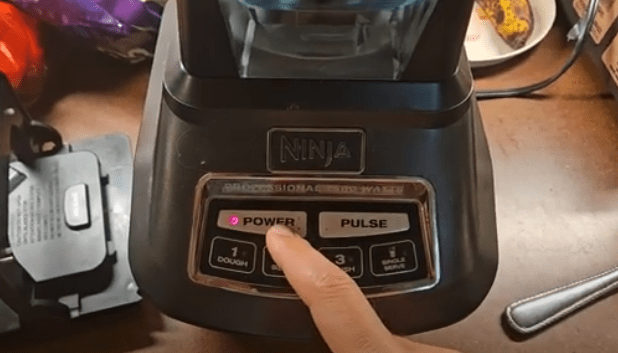
5. The Power Button Was Never Turned On
This sounds obvious—but it happens all the time.
Plugging in the blender does not automatically turn it on. The power button must be pressed first. Until that happens, none of the Auto-iQ buttons will light up or respond.
Many users assume the smoothie or preset buttons should work immediately—but they won’t unless the blender is powered on.
What To Do
- Plug the blender into a confirmed working outlet
- Press the power button on the control panel
- Look for illuminated buttons
- Only then select your blending program
If no buttons light up after pressing power and assembly is correct, you may be dealing with a defective unit.
Ninja Auto-iQ Blender Has Blinking Lights
Blinking lights usually mean the blender knows something is wrong.
Most of the time, blinking lights indicate:
- Improper assembly
- Lid not locked
- Handle in the wrong position
- Pitcher not seated correctly
The good news?
Blinking lights usually mean the blender is not dead.
Once everything is aligned correctly, the blinking should stop and the blender should operate normally.
You can read this article to fix the Ninja Power Button Blinking Issue.
Ninja Auto-iQ Blender Has No Lights at All
This is where things get more serious.
If your Ninja Auto-iQ blender shows:
- No lights
- No beeps
- No blinking
- No response whatsoever
Even after verifying assembly, outlets, and power buttons—there’s a strong chance you’re dealing with a defective unit.
Several users reported brand-new blenders from major retailers that were completely dead on arrival. Some even had electricians test the outlets and wiring with the same result: the blender was a dud.
Brand-New Ninja Blender Not Turning On (Out of the Box)
This is one of the most frustrating scenarios.
Users have reported:
- Following the manual step by step
- Double-checking arrows, handles, lids, and blades
- Testing multiple outlets
- Getting absolutely no response
In many of these cases, the blender was eventually returned and confirmed defective.
If your brand-new Ninja Auto-iQ blender:
- Has no lights at all
- Makes no sounds
- Shows no blinking
- Is fully assembled correctly
You likely didn’t do anything wrong.
Ninja Auto-iQ Blender Turns On Then Shuts Off
Some users report a different issue: the blender starts blending, then shuts off or reboots.
This usually points to:
- Motor protection kicking in
- Overheating
- Blade jamming
- Early motor failure
Blade Jamming and Motor Shutdown
If the blade gets stuck—even once—it can trigger the motor’s safety system. After repeated jams, some blenders begin shutting off even when blending light ingredients like water.
Users have reported:
- Blender turning off mid-blend
- LED lights coming back on after a few seconds
- Only completing one blending cycle before shutting down
This often gets worse over time.
When It’s Not User Error: Defective Ninja Blenders
Despite all the setup checks, there are times when the blender is simply bad.
Signs you may have a defective Ninja Auto-iQ blender:
- No lights from day one
- Rebooting constantly
- Shutting off while blending water
- Clicking and locking correctly but doing nothing
- Motor dying within months of light use
Multiple users confirmed receiving replacements—sometimes just the motor base—after contacting Ninja support, even outside the standard warranty period.
Step-by-Step Checklist Before Assuming It’s Broken
Before returning your blender, go through this checklist carefully:
- Pitcher fully seated and clicked
- Handle on front left or front right corner
- Lid arrow aligned with handle arrow
- Lid handle locked down until it clicks
- Blade properly installed
- Power button pressed
- Outlet confirmed working
If you’ve done all of this—and still get nothing—it’s likely not your fault.
What to Do If Your Ninja Auto-iQ Blender Is a Dud
Return or Exchange It
If you bought it recently, returning or exchanging it through the retailer is often the fastest solution.
Contact Ninja Customer Support
Ninja support has been known to:
- Replace motor bases
- Offer discounted parts
- Ship replacements even slightly out of warranty
Keep your model number and purchase details handy.
Tips to Avoid Future Ninja Blender Power Issues
- Always lock the lid slowly and firmly
- Avoid overloading thick mixtures
- Stop blending if the blade jams
- Let the motor cool between cycles
- Double-check handle placement every time
Frequently Asked Questions
Why won’t my Ninja Auto-iQ blender turn on?
Most often due to improper assembly, handle position, or lid locking issues. If there are no lights at all, it may be defective.
What does a blinking light mean on a Ninja blender?
It usually means something isn’t assembled correctly—most commonly the lid or handle.
Can the blender work if the lid is slightly loose?
No. The lid must be fully locked until it clicks.
How do I know if my Ninja blender motor is dead?
No lights, no sounds, no blinking—even after correct assembly—are strong indicators.
Is this a common Ninja blender problem?
Based on user reports, yes—especially confusion around lid and handle positioning.
Final Thoughts
Ninja Auto-iQ blenders are powerful, but they’re also unforgiving. When everything is aligned perfectly, they work great. When it’s even slightly off, they act completely dead.
The frustrating truth is that some blenders really are defective out of the box, and no amount of clicking, twisting, or re-locking will fix that.
If you’ve followed every step and still get nothing, don’t beat yourself up. You’re probably not doing anything wrong.

I’m Sloane Everly, the heart and soul behind TheTidyPorch.com, where I pour my love for home decor, interior styling, and curated living into everything I do.
I’m all about turning houses into homes that feel like you—full of warmth, character, and a little bit of magic.
My style? Think cozy charm with a splash of bold, always designed to make your space feel like a hug you never want to leave.