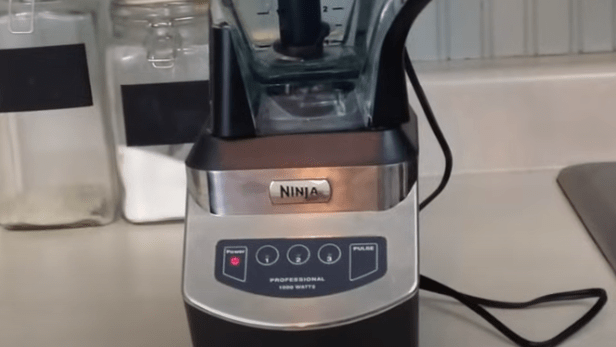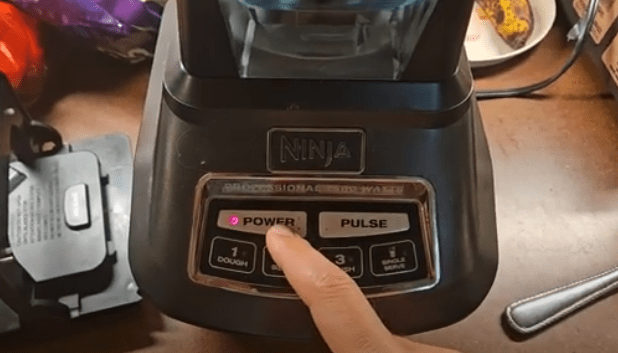
If your Ninja blender white light is blinking and it won’t start, you’re not alone. This issue can be frustrating, especially if your blender is brand new. A blinking white light usually signals a safety feature has been activated, preventing the blender from operating. In this guide, we’ll walk you through common causes, troubleshooting steps, and solutions to get your Ninja blender working again.
Table of Contents
- What Does The Blinking White Light Mean On Ninja Blender?
- Common Causes of a White Blinking Light
- Step-by-Step Ninja Blender Troubleshooting
- When to Contact Ninja Support
- Tips to Prevent Future Issues
- FAQ
- Conclusion
What Does The Blinking White Light Mean On Ninja Blender?
A blinking white light on your Ninja blender is more than just a warning—it’s a safety mechanism designed to protect you and the appliance. Typically, it indicates that:
- The blender’s lid or container isn’t properly secured.
- The motor has overheated.
- There’s a problem with the power connection, motor, or safety switch.
When this happens, the blender may remain completely silent, and the motor won’t start until the issue is resolved.
Common Causes of a White Blinking Light
1. Lid or Container Not Properly Secured
One of the most common reasons for a blinking white light is improper seating of the container or lid. Ensure that:
- The lid is securely locked into place.
- The pitcher is correctly seated on the base.
- If using a single-serve cup, the blade assembly is attached correctly.
Even a slight misalignment can trigger the safety sensor and prevent operation.
2. Overheating
Blenders can overheat if used continuously for long periods. Signs of overheating include a warm motor base and the white light blinking. To fix this:
- Unplug the blender.
- Let it cool for 15–20 minutes before trying again.
3. Power Connection Issues
Sometimes the problem isn’t the blender—it’s the power source. Check that:
- The blender is plugged into a functioning outlet.
- Avoid using extension cords that may not provide adequate power.
4. Motor Jammed
If something is blocking the blades, such as a hard piece of food, the motor may not start. To troubleshoot:
- Unplug the blender.
- Remove the contents and inspect the blades.
- Try spinning the blades manually to ensure they move freely.
5. Faulty Safety Switch
The safety switch prevents the blender from operating if the lid isn’t properly secured. If the switch is defective, it may fail to detect the lid, resulting in the white light blinking. This usually requires professional repair or replacement.
6. Motor or Control Board Issues
If none of the above solutions work, your blender may have an internal defect in the motor or control board. In such cases, contact Ninja customer support for a replacement or repair.
Step-by-Step Ninja Blender Troubleshooting
- Check that the lid and container are properly aligned.
- Confirm that the power outlet is functional.
- Allow the blender to cool if it has overheated.
- Inspect and clear any obstructions from the blades.
- Reset the blender by unplugging it for 5 minutes.
- If the problem persists, consider a defective safety switch or control board.
When to Contact Ninja Support
If your blender is brand new and unresponsive despite following all troubleshooting steps, it’s likely a defective unit. Contact Ninja support to request a replacement or repair:
Returning a defective blender is standard practice, even if it involves shipping costs. Ninja’s customer service can guide you through the process.
Tips to Prevent Future Issues
- Always ensure the lid and container are properly secured before blending.
- Avoid overloading the blender with large or hard items.
- Allow the motor to rest between prolonged uses to prevent overheating.
- Regularly clean the blender to avoid blade obstructions.
FAQ
Q1: Why is my Ninja blender blinking white but not working?
A1: The blinking white light usually indicates a safety lock, overheating, or motor issue.
Q2: Can I fix it at home?
A2: Many issues, such as misaligned lids or overheating, can be fixed at home. Persistent problems may require support.
Q3: Is overheating normal?
A3: Occasional overheating is normal if the blender is used for long periods. Let it cool down to prevent damage.
Q4: What if the blender is new and won’t start?
A4: If troubleshooting doesn’t work, it may be a defective unit. Contact Ninja for a replacement.
Q5: How do I contact Ninja customer support?
A5: Use this link to reach Ninja support.
Conclusion
A Ninja blender white light blinking can be caused by several factors, from lid misalignment to internal defects.
By following this step-by-step troubleshooting guide, you can often resolve the problem quickly.
For persistent issues, contacting Ninja support ensures your appliance is replaced or repaired under warranty. Proper handling and maintenance will help prevent future occurrences.
Next Reads:

I’m Sloane Everly, the heart and soul behind TheTidyPorch.com, where I pour my love for home decor, interior styling, and curated living into everything I do.
I’m all about turning houses into homes that feel like you—full of warmth, character, and a little bit of magic.
My style? Think cozy charm with a splash of bold, always designed to make your space feel like a hug you never want to leave.