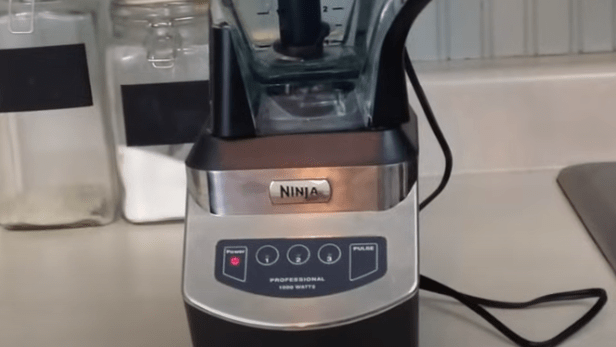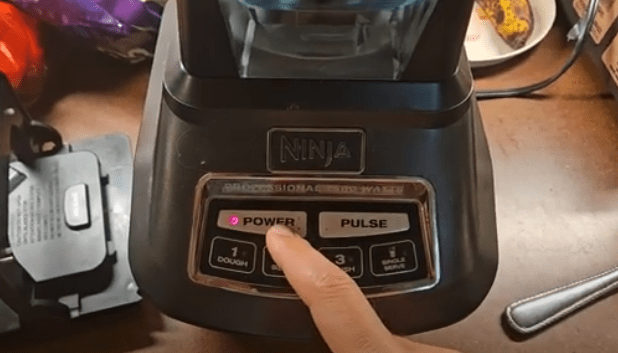
If your Ninja blender red light is flashing and it won’t start, you’re not alone. This is a common issue that usually signals a safety feature has been triggered, a motor overload has occurred, or there’s a power problem. In this guide, we’ll cover why your Ninja blender may be flashing red, step-by-step troubleshooting, real user experiences, and when to contact support.
What Does the Flashing Red Light Mean On Ninja Blender?
A flashing red light on your Ninja blender is more than a warning—it’s a safety mechanism designed to prevent operation under unsafe conditions. Common reasons include:
- The pitcher or lid isn’t properly secured.
- The blender motor is overloaded or jammed.
- Power supply issues or outlet problems.
- Defective unit or damaged parts.
When the red light blinks, the blender may remain completely silent, and pressing the speed or pulse buttons won’t start it.
Common Causes of a Flashing Red Light
1. Improper Assembly or Lid Not Locked
One of the most frequent causes is improper assembly:
- The pitcher may not be seated correctly on the base.
- The lid may be misaligned, or the safety tab not fully engaged.
- The handle must be pressed down completely to engage the safety sensor.
Even a small misalignment can trigger the red light and prevent the blender from operating.
2. Motor Overload or Jammed Blades
Blenders can overheat or jam, especially when blending hard ingredients:
- Overheating occurs if the blender is used continuously.
- Blade obstructions, like chunks of fruit or frozen items, can prevent the motor from spinning.
3. Power Supply Issues
Sometimes the issue isn’t the blender itself:
- Check that the blender is plugged into a functioning outlet.
- Avoid extension cords that may not supply enough power.
4. Defective or Damaged Unit
In some cases, a new unit may have a manufacturing defect:
- Broken lid, base, or safety tabs.
- Control board or motor defects that prevent startup.
Step-by-Step Ninja Blender Troubleshooting To Fix The Flashing Red Light
Step 1: Check Lid & Pitcher Alignment
- Align arrows on the lid and pitcher/base.
- Press the handle down fully until it clicks.
- Reseat the pitcher on the base and ensure it’s locked.
Step 2: Reset the Blender
- Unplug the blender for 5–10 minutes.
- Plug it back in and try again.
- For the NJ601AMZ model, hold the power button for 10 seconds to reset the internal breaker if needed.
Step 3: Inspect for Overload or Jam
- Let the motor cool for 15–20 minutes if overheated.
- Remove the pitcher, check the blade assembly for obstructions, and clean debris.
Step 4: Check Power Supply
- Try a different outlet.
- Inspect the power cord for damage.
Step 5: Inspect for Damage or Defective Parts
- Check for broken lids, cups, or safety tabs.
- If the blender still doesn’t operate properly, it may be defective.
Real User Experiences
Users commonly report:
- Red light blinking when the lid isn’t fully secured.
- The need to hold the pitcher for it to blend, indicating a possible defective base.
- Misaligned arrows on the lid and pitcher causing the blender not to start.
- Broken plastic tabs or lids preventing the unit from locking properly.
Tips from experienced users:
- Ensure arrows on the lid and pitcher align perfectly.
- Check for secondary rubber seals that may interfere with locking.
- Resetting and proper assembly usually resolves most issues.
When to Contact Ninja Support
If the red light persists after troubleshooting:
- Your blender may be a defective unit.
- Contact Ninja support for replacement or repair, especially for new units.
- Support link: Ninja Customer Support
Tips to Prevent Future Issues
- Always align lid and pitcher properly before blending.
- Avoid overloading or blending very hard items continuously.
- Keep safety tabs, blades, and pitcher clean.
- Handle the blender carefully to prevent damage to plastic tabs or the base.
FAQ
Q1: Why is my Ninja blender red light blinking but not blending?
A1: It usually indicates a safety lock, misalignment, motor overload, or defective part.
Q2: Can I fix it at home?
A2: Yes, most issues are resolved by aligning the lid/pitcher, resetting the blender, or checking for jams.
Q3: What does holding the pitcher indicate?
A3: If you need to hold it to blend, your blender may have a defective base or misaligned parts.
Q4: How do I reset the blender?
A4: Unplug for 5–10 minutes and plug it back in. NJ601AMZ users can hold the power button for 10 seconds.
Q5: What if the blender is new and still won’t start?
A5: Contact Ninja customer support for replacement or repair.
Conclusion
A Ninja blender flashing red light can be caused by lid misalignment, jammed blades, power issues, or defective units. By following this step-by-step troubleshooting guide, you can often resolve the problem at home. Persistent issues, especially with new blenders, should be addressed by Ninja support for repair or replacement. Proper handling and assembly will prevent most future issues.
Next Reads:

I’m Sloane Everly, the heart and soul behind TheTidyPorch.com, where I pour my love for home decor, interior styling, and curated living into everything I do.
I’m all about turning houses into homes that feel like you—full of warmth, character, and a little bit of magic.
My style? Think cozy charm with a splash of bold, always designed to make your space feel like a hug you never want to leave.